For agents
Brimline gives your agents the same numbers as the menu bar. It holds no AI and is not a prompt: it is a command and a local MCP server that answer with numbers when an agent asks. It never switches accounts.
How it works
The app reads the tokens and calls the provider. After each reading it writes the numbers, and only the numbers, to a cache: ~/Library/Application Support/Brimline/usage.json. The MCP server and brimline status read that cache and never see a token. Only brimline status --live reads the Keychain and asks the provider itself, with the same code as the app. Every answer with numbers says how old they are. Nothing here writes to your Claude Code folders or to the Keychain, and nothing starts or stops an agent.
Is it a prompt?
No. Brimline holds no AI model. When your agent starts, its client (Claude Code, Codex) reads a short notice from the server: the names and descriptions of its three tools, and a short line of guidance. That text helps the model know when to call a tool; the answers themselves are plain numbers in JSON.
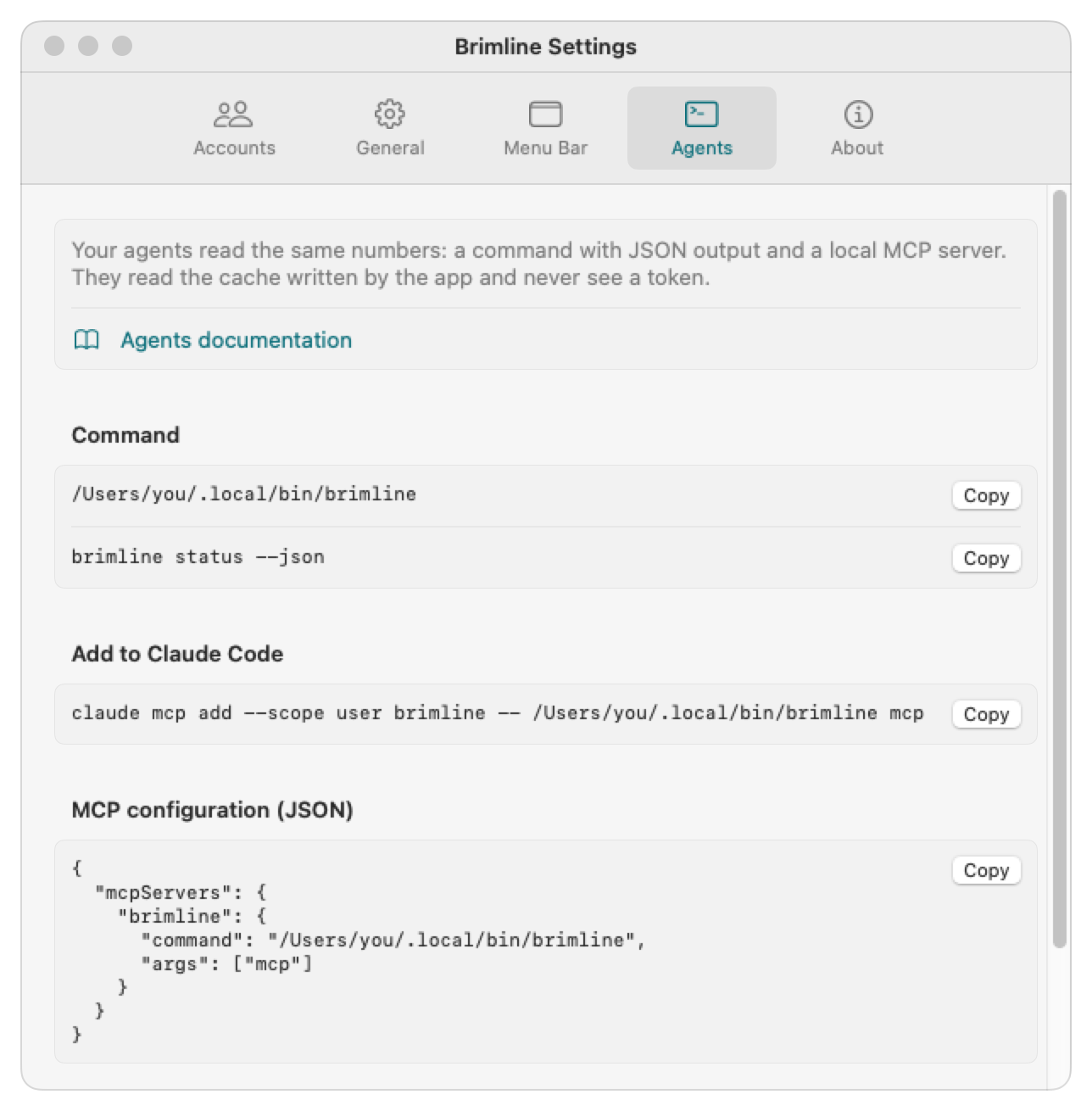
The command
# Every account, from the app's cache
brimline status
# The same, as JSON
brimline status --json
# A fresh reading, without the cache
brimline status --live
# One provider only (claude, chatgpt, gemini, grok or cursor)
brimline status --provider chatgpt --json
# The providers, and whether each is on
brimline providers
# The MCP server, on standard input and output
brimline mcp--live reads the provider directly, with the same code as the app, for when the app is not running. The command is linked at ~/.local/bin/brimline by the installer; its exact path is shown in Settings, tab Agents.
The MCP server
brimline mcp is a local MCP server over standard input and output, with no network port. It offers three tools:
list_accounts- The accounts, each with its provider, address, organization and state, without numbers.
get_usage- The limits of every account, of one provider (
provider:claude,chatgpt,gemini,grokorcursor) or of one account (account: an address or an account id): each limit with its percentage used and its reset time, and the age of the numbers. Hidden accounts are left out unlessinclude_hiddenis true. best_account- The account with the most room left, among the accounts of one provider (
provider,claudeby default, so a call written before the providers answers as it did).window:any(every limit that applies, the default),session,week,day,monthorperiod, among those that exist for the provider (asking for another one is an error, not an empty answer);model, optional, adds the limit of that model. Hidden accounts, accounts never read, and accounts whose sign-in was refused or is missing are left out; unavailable ones come last. An account that has none of the limits asked for, for example a team seat without a weekly limit across all models, is judged on its tightest limit, so the limit that decides can be the session.
In Claude Code
The installer links the command at ~/.local/bin/brimline. The Agents tab gives the same line with your exact path, ready to copy. --scope user makes it available in all your projects; without it, Claude Code adds it to the current project only.
claude mcp add --scope user brimline -- ~/.local/bin/brimline mcpIn Codex (OpenAI)
Codex declares an MCP server in one line, or in ~/.codex/config.toml; in the file, give the full path of the command. Through Brimline, Codex reads the numbers of every provider that is on: Claude always, and ChatGPT, Gemini, Grok and Cursor once you have turned them on. A provider that is off has no account in the answers.
codex mcp add brimline -- ~/.local/bin/brimline mcp[mcp_servers.brimline]
command = "/Users/<you>/.local/bin/brimline"
args = ["mcp"]In another MCP client
Clients that take the common mcpServers JSON block accept this one. Replace /Users/<you> with your home folder: configuration files need an absolute path and do not expand ~. The Agents tab gives the block with your path filled in.
{
  "mcpServers": {
    "brimline": {
      "command": "/Users/<you>/.local/bin/brimline",
      "args": ["mcp"]
    }
  }
}Try it yourself
Your agent does exactly this. Start the app, then paste this in a terminal: it asks the server for the Claude account with the most room this week (provider is claude, the default, written out here), and prints the answer.
printf '%s\n' \
  '{"jsonrpc":"2.0","id":1,"method":"initialize","params":{"protocolVersion":"2025-06-18","capabilities":{},"clientInfo":{"name":"try","version":"0"}}}' \
  '{"jsonrpc":"2.0","id":2,"method":"tools/call","params":{"name":"best_account","arguments":{"provider":"claude","window":"week"}}}' \
| brimline mcp | tail -n 1 | python3 -m json.toolThe answer, shortened (the full one also lists each limit of each account):
{
  "result": {
    "isError": false,
    "structuredContent": {
      "provider": "claude",
      "window": "week",
      "model": null,
      "age_seconds": 42,
      "best": {
        "email": "your@claude.ai",
        "source": "~/.claude",
        "status": "ok",
        "stale": false,
        "headroom_percent": 58,
        "binding_limit": { "kind": "weekly", "percent": 42, "resets_in_seconds": 183600 }
      },
      "ranking": [
        { "email": "your@claude.ai", "headroom_percent": 58 },
        { "email": "team@claude.ai", "headroom_percent": 12 }
      ]
    }
  }
}best is the first of ranking. headroom_percent is the room left on the limit that decides (binding_limit); age_seconds and stale say whether the numbers are fresh. Your numbers and addresses will differ.
Two providers, one question
Say you hold a Claude account and a ChatGPT account (read through Codex), both on. You ask your agent: “Which of my two assistants has more room this week for a long task?” best_account ranks the accounts of one provider at a time, so the agent calls it once per provider:
{ "name": "best_account", "arguments": { "provider": "claude",  "window": "week" } }
{ "name": "best_account", "arguments": { "provider": "chatgpt", "window": "week" } }The answers, shortened to what decides (the numbers are an example):
{ "provider": "claude",
  "best": { "email": "your@claude.ai", "source": "~/.claude", "headroom_percent": 58,
            "binding_limit": { "kind": "weekly", "percent": 42, "resets_in_seconds": 183600 } } }

{ "provider": "chatgpt",
  "best": { "email": null, "source": "~/.codex", "headroom_percent": 29,
"binding_limit": { "kind": "weekly", "percent": 71, "resets_in_seconds": 367200 } } }The agent compares: Claude has 58 % of its week left and ChatGPT 29 %, so the long task goes to Claude; ChatGPT's week resets in about 4 days, Claude's in about 2. A ChatGPT account read through Codex has no address (email is null): it is told apart by its source, here ~/.codex. A provider that gives no limit Brimline can read is listed by list_accounts and never ranked: Gemini without Antigravity has status: not_readable, and a free Grok account has status: ok, an empty limits and the sentence “xAI returns no credit limit for this account.”
In words
You ask: “Before this long task, which of my Claude accounts has the most room this week?” The agent calls best_account with window: week, gets your@claude.ai with 58% room left on the week, resetting in about two days, and answers: “Use your@claude.ai: claude in its usual folder.” The session you are in stays on its account; you start the next one.