Brimline

A menu bar app for macOS

See how much of every AI subscription you have left, account by account.

Brimline puts the limits of your AI subscriptions side by side in the menu bar of your Mac: Claude, ChatGPT, Gemini, Grok and Cursor, account by account. Your agents read the same numbers.

Works with

  • Claude
  • ChatGPT
  • Gemini
  • Grok
  • Cursor

Free. Read only. Mac only: macOS 14 or later, Apple silicon or Intel; no Windows or Linux version. Five providers, each tried on a real account.

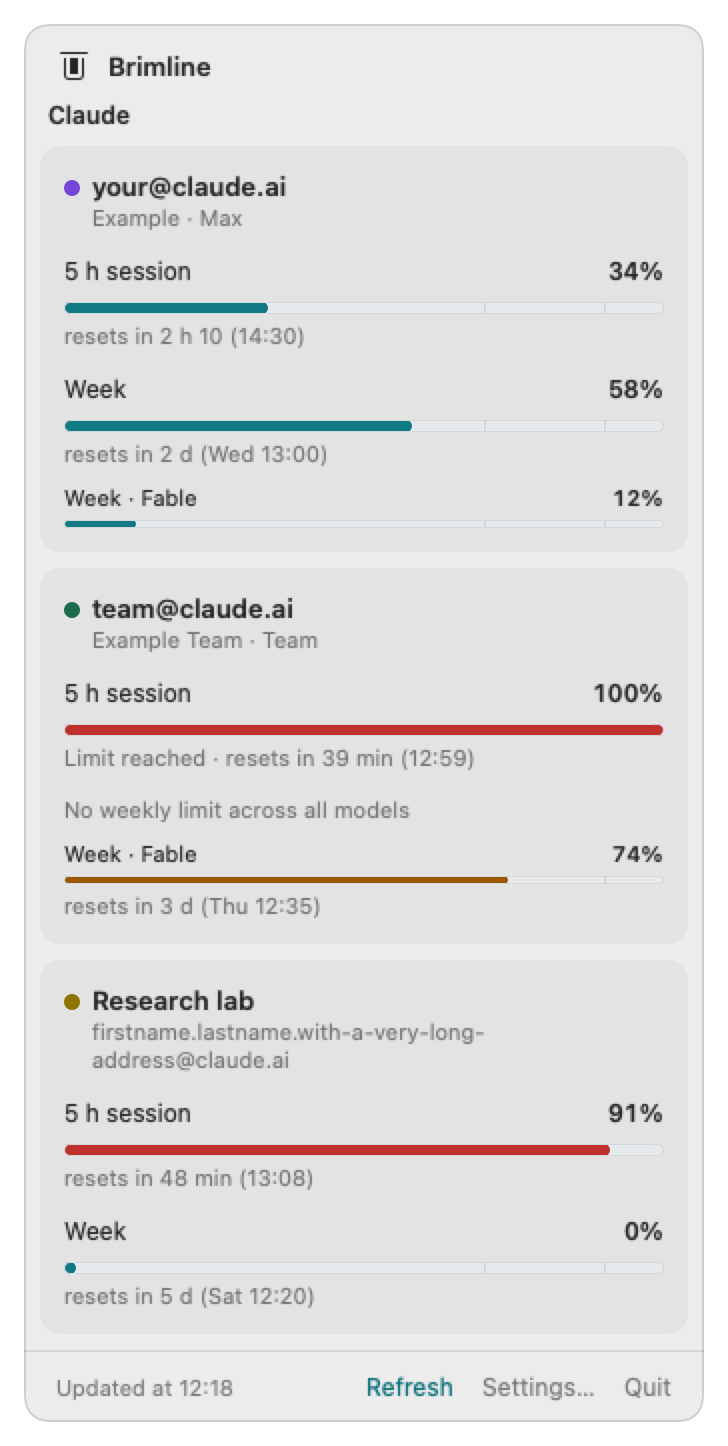
The Brimline window with three example accounts, each with a dot of its own color before its name: your@claude.ai, team@claude.ai at its 5 h session limit, and Research lab with a long address; each limit with its gauge, its percentage and its reset time.

The problem

Three accounts, one indicator, and no name on it

It is Tuesday, 10:40. You have a personal Claude account, a seat on your company's team, and a second team for a client. An agent is halfway through a refactor when it stops: limit reached. Which account was it? The indicator built into the tool shows one account at a time, and does not say which one. To know where the others stand, you open each tool, or each settings page, one by one.

And the agent itself never saw the limit coming: it found out when its request failed.

What Brimline does

Every account, every limit, at a glance

One gauge in the menu bar

A small horizontal gauge, lying down, with one part per account, each in its own color: the whole is the average of your accounts, and a red exclamation mark appears as soon as one account reaches 90 %. Add the percentage next to it if you like.

One card per account

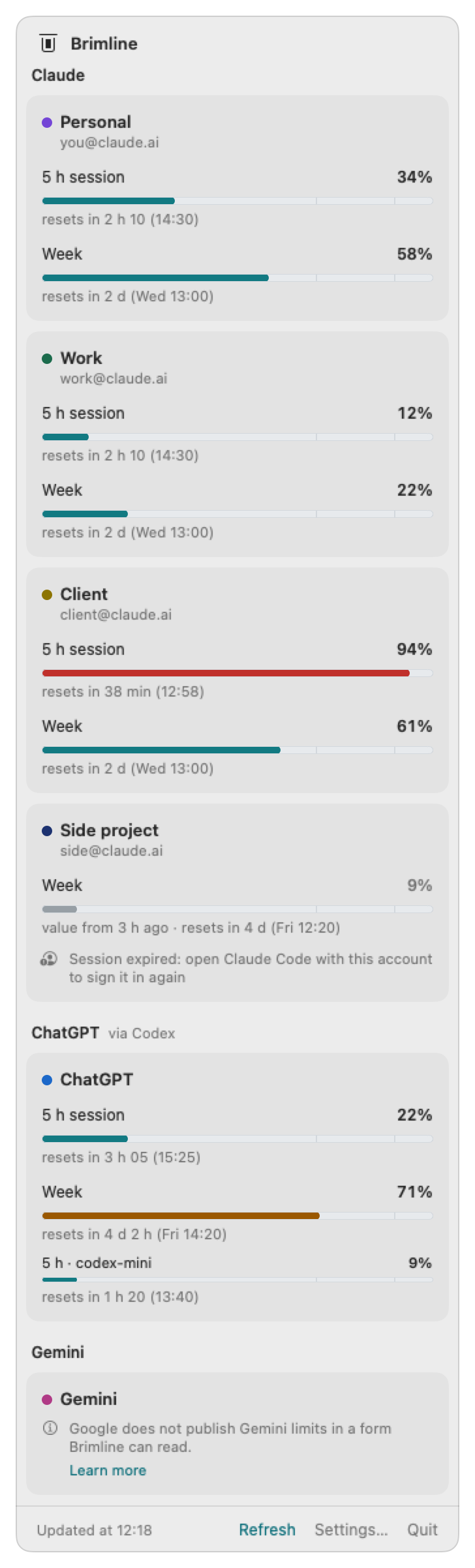
Cards grouped by provider, each account with a dot of its color and under its email address when its provider gives one, with one line per limit: the five hour session, the week or the month, and the limit of a model when there is one. Each line gives the percentage in words and the time it resets.

States that say what is true

Up to date, old data (with its age), session expired, unavailable. When Brimline cannot read a number, or a provider has none to give (a free Grok account, for example), it says so in a sentence instead of showing a wrong one.

Several accounts? Brimline finds them on its own.

A personal Claude account, one for work, one for a client, plus ChatGPT or Gemini: give each Claude account its own Claude Code folder, turn the other providers on with a switch in Settings, and Brimline finds every account by itself and gives each one its color. One account or ten, still one gauge.

  • Personal
  • Work
  • Client
  • ChatGPT

One gauge in the menu bar, one share per account in its color. When one account reaches 90 %, the end of the gauge turns into a red exclamation mark.

Go further: change the color of an account, show a Claude account from Claude Code's reports, hide the icons of other apps.

The Brimline window with four example Claude accounts (Personal, Work, Client, Side project), each with a dot of its own color before its name, then ChatGPT through Codex and Gemini. Client is at 94 % of its 5 h session, in red; Side project is dimmed, with its last numbers and “Session expired”. The numbers are invented.
Four Claude accounts, ChatGPT and Gemini in one window (invented numbers).

Principles

Built to be trusted with your sign-ins

  • Read only

    Brimline reads the sign-in your AI tools already keep on your Mac. It never refreshes, rewrites or moves it, so it cannot sign you out of a tool. One exception, said out loud: to read Gemini, it launches Google's own command agy --print /usage, and Google's program may then renew its own sign-in; Brimline neither reads nor writes that one.

  • Nothing leaves your Mac

    Except the usage requests to each provider. No Brimline server, no telemetry, no token in a log or a cache.

  • One account, one line, one address

    Several accounts of the same provider are the main case, not an afterthought. Each is named by its email address.

  • One plugin per provider

    Each provider is a small plugin: Claude, ChatGPT through Codex, Gemini through Antigravity, Grok and Cursor so far. Claude is on; every other provider is off until you turn it on in Settings, and a provider that is off is not touched at all.

  • Honest about fragility

    As far as we know, no provider documents an endpoint for subscription limits (Google documents a command, /usage in Antigravity, but not the format of its text). Brimline uses the internal ones the official tools use, which can change without notice. When one breaks, Brimline says so. And it says what it has tried: a provider is called read and checked only for the plan it was tried on.

For agents

Your agents can see which account has room left

Brimline is not a prompt and holds no AI. It is a small program on your Mac: the app reads the limits of your accounts and keeps the numbers in a file, and the brimline command and its local MCP server hand those numbers to any agent that asks.

  1. Declare it once in your agent: Claude Code, or Codex, OpenAI's coding agent, with the line on the right.
  2. Ask your agent: “Which of my Claude accounts has the most room left this week?” It calls the best_account tool and gets your accounts ranked, each with its room left, the limit that decides, when it resets, and how old the numbers are. The tool ranks one provider at a time, so to compare Claude and ChatGPT your agent asks twice, with provider: claude and then provider: chatgpt.
  3. It tells you which account to use. You, or your script, start the tool with that account, for example CLAUDE_CONFIG_DIR=~/.claude-work claude. Brimline never switches accounts, and gives your agent no way to.

The numbers are those of every provider you turned on, whichever agent reads them: a Codex agent sees your Claude accounts, and a Claude Code agent your ChatGPT ones. A provider that is off has no account in the answers, and an agent cannot turn it on for you.

How it works, with an example you can run

Claude Code

claude mcp add --scope user brimline -- ~/.local/bin/brimline mcp

Codex

codex mcp add brimline -- ~/.local/bin/brimline mcp

Comparison

Other good tools, and what each one does

Brimline owes them a lot. Here are the facts side by side: yes, no, partly, or not verified. If one of them fits your need better, use it.

Swipe sideways to see every tool.

Brimline and five other tools, feature by feature
FeatureThis toolBrimlineClaude Usage TrackerClaudeBarCodexBarOpenUsageQuotio
Shows several Claude accounts side by side

Yes

One Claude Code folder per account, named by its address

Yes

Unlimited profiles, shown together in menu bar

Yes

Several Claude logins side by side

More (ClaudeBar: Shows several Claude accounts side by side)

Claude and Codex can each watch more than one login; other built-in providers have one account.

Partly

Several Claude accounts via opt-in claude-swap

More (CodexBar: Shows several Claude accounts side by side)

Needs the separate cswap tool and the option 'Read accounts from claude-swap'.

Yes

One card per Claude account and organization

More (OpenUsage: Shows several Claude accounts side by side)

Accounts also come from Claude Swap's saved account list, shown with organization and email.

Yes

Several accounts per provider

Reads providers other than Claude

Yes

ChatGPT, Gemini, Grok and Cursor, each off by default

More (Brimline: Reads providers other than Claude)

Each was tried on a real account on 27 October 2026, only on the plan named in docs/providers.md (ChatGPT Free, Cursor Free, a Google account, a free Grok account). Two comparisons with the provider's own usage page are still pending (ChatGPT, Cursor), Gemini's percentage was seen at 100 % remaining only, and a free Grok account gets no limit from xAI, which Brimline says in words.

Yes

Claude plus OpenAI Codex (2 providers)

More (Claude Usage Tracker: Reads providers other than Claude)

Registry pattern allows more providers; Codex covered by mocked tests only per changelog.

Yes

Over a dozen more (Codex, Gemini, Cursor...)

More (ClaudeBar: Reads providers other than Claude)

Its README table lists 28 providers and its introduction says 'and 15 more'.

Yes

About 110 providers (Codex, Gemini, Cursor...)

More (CodexBar: Reads providers other than Claude)

Count taken from the README social image alt text; the README lists each provider.

Yes

11 providers, Claude included

More (OpenUsage: Reads providers other than Claude)

Antigravity, Claude, Codex, Copilot, Cursor, Devin, Grok, Ollama, OpenCode, OpenRouter, Z.ai.

Yes

46 providers in the CLI, 8 in the macOS app

More (Quotio: Reads providers other than Claude)

App lists 8 providers plus Cursor and Trae (monitor only).

Has a built-in MCP server

Yes

Local MCP server over stdio (brimline mcp)

No

Not in its documentation

More (Claude Usage Tracker: Has a built-in MCP server)

Feature lists, README and changelog searched: no MCP server mentioned.

Yes

Local MCP server, off until you turn it on

More (ClaudeBar: Has a built-in MCP server)

Four tools: quota_status, providers, forecast, usage_days. Stays off until switched on in Settings.

No

Not in its documentation

More (CodexBar: Has a built-in MCP server)

docs/cli.md lists no MCP command; mentions of MCP concern provider usage data.

No

Not in its documentation

More (OpenUsage: Has a built-in MCP server)

README features list and docs/ index mention CLI and local HTTP API only; MCP appears only as a Claude Code credential field.

No

Not in its documentation

More (Quotio: Has a built-in MCP server)

Not in the README feature lists, CLI reference or changelog.

Has a command with JSON output

Yes

brimline status --json

No

Not in its documentation

More (Claude Usage Tracker: Has a command with JSON output)

Its terminal features are a status line script and one launcher per profile.

No

Not in its documentation

More (ClaudeBar: Has a command with JSON output)

Scripting goes through its claudebar:// links, its local API and a status file.

Yes

CLI prints JSON: codexbar usage --format json

Yes

openusage command prints limits as JSON

More (OpenUsage: Has a command with JSON output)

One-shot command, --force bypasses the five-minute cache.

Yes

CLI prints JSON reports

Has a local HTTP API

No

Command and MCP server only

No

Not in its documentation

More (Claude Usage Tracker: Has a local HTTP API)

Only outgoing HTTPS calls are described.

Yes

Read-only API on 127.0.0.1:19848, off by default

More (ClaudeBar: Has a local HTTP API)

Off until switched on in Settings; endpoints /status, /providers, /forecast, /usage/days.

Yes

codexbar serve, on 127.0.0.1 by default

More (CodexBar: Has a local HTTP API)

Foreground command serving usage and cost JSON and a web UI.

Yes

Read-only API on 127.0.0.1:6736

More (OpenUsage: Has a local HTTP API)

Loopback only, never serves credentials; routes /v1/limits and /v1/usage.

Yes

Loopback REST API via serve

More (Quotio: Has a local HTTP API)

Read-only snapshots on 127.0.0.1:6767; managed operations need a token.

Switches accounts by itself

No

Never switches accounts

More (Brimline: Switches accounts by itself)

It tells an agent which account has room; you, or your script, start the tool with it.

Yes

Switches profile at the session limit

More (Claude Usage Tracker: Switches accounts by itself)

Whether it is on by default is not stated in its README.

Partly

Switch when low, off by default

More (ClaudeBar: Switches accounts by itself)

New terminal sessions move to the login with the most left below a chosen percentage (5-30%), with Undo. Running sessions keep theirs.

No

No automatic account switching

More (CodexBar: Switches accounts by itself)

Switching only on click ('Switch Account...'), which runs cswap --switch-to.

No

Not in its documentation

More (OpenUsage: Switches accounts by itself)

Cards are per account; docs say it does not modify Claude Swap's account list or rotate vault tokens.

Yes

Its proxy rotates accounts (Round Robin, Fill First)

More (Quotio: Switches accounts by itself)

It applies to its optional local proxy. Whether it is on by default is not stated.

Writes into another tool's sign-in or settings

No

Read only: no token, Keychain or folder written

Yes

Updates Claude Code credentials and settings.json

Yes

Writes the renewed token back to Claude Code

More (ClaudeBar: Writes into another tool's sign-in or settings)

Writes a refreshed token back to the Claude Code Keychain item; may mark a folder trusted in ~/.claude.json; adds shell functions for claude/codex.

Partly

Own code never rewrites Claude Code credentials

More (CodexBar: Writes into another tool's sign-in or settings)

The opt-in cswap switch (run on click) changes the account that Claude Code uses.

Yes

Writes the renewed token back to Claude Code

More (OpenUsage: Writes into another tool's sign-in or settings)

Only the access token, refresh token and expiry; Claude Desktop is never written.

Yes

Configures Claude Code to go through its proxy

More (Quotio: Writes into another tool's sign-in or settings)

Agent setup writes the agent settings (with backups); the Claude Code credentials stay read only.

Passes your requests through its own proxy

No

Never sees or routes your prompts

No

Not in its documentation

More (Claude Usage Tracker: Passes your requests through its own proxy)

README states HTTPS communication with claude.ai and Anthropic API.

No

Not in its documentation

More (ClaudeBar: Passes your requests through its own proxy)

Local API is described as read-only quota data; no proxy for AI requests appears in README, docs index or Claude docs.

No

Not in its documentation

More (CodexBar: Passes your requests through its own proxy)

It reads usage from provider endpoints; 'LLM Proxy' is a provider it reads, not a relay.

No

Not in its documentation

More (OpenUsage: Passes your requests through its own proxy)

It only has an optional proxy, set by you, for its own provider requests.

Yes

Local proxy (CLIProxyAPI) your agents can use

More (Quotio: Passes your requests through its own proxy)

Agents can be configured to route requests through it.

Renews an expired token itself

No

Waits for Claude Code to renew it

More (Brimline: Renews an expired token itself)

It shows the last known numbers with their age.

Yes

Renews expired tokens (Codex; Claude when switching)

Yes

Renews an expired Claude token

More (ClaudeBar: Renews an expired token itself)

Changelog: a renewed token asks for the scopes your login already has, not a fixed three.

Yes

Refreshes expired Claude OAuth tokens itself

Yes

Renews Claude Code tokens itself

More (OpenUsage: Renews an expired token itself)

Claude Desktop tokens are read-only and renewed by Desktop itself.

Yes

Renews some expired tokens itself

More (Quotio: Renews an expired token itself)

Antigravity, Kiro, Vertex AI; changelog also lists Claude OAuth auto-refresh (0.x).

Offers a signed download or Homebrew

No

Built from source, signed ad hoc, no Homebrew

Yes

Signed and notarized zip; Homebrew cask

Yes

Signed, notarized DMG and Homebrew cask

Yes

Notarized app on GitHub Releases, Homebrew cask

More (CodexBar: Offers a signed download or Homebrew)

README also gives: brew install --cask codexbar.

Yes

Homebrew cask and signed, notarized DMG

Yes

Signed, notarized DMG and Homebrew cask

Runs on Linux

No

macOS 14 or later

No

macOS only (14.0+)

More (Claude Usage Tracker: Runs on Linux)

Described as a native macOS menu bar app, macOS 14 or later.

Partly

App is macOS 15+; modules build on Linux

More (ClaudeBar: Runs on Linux)

Changelog: modules build and pass tests on Linux so a client there can reuse them. No Linux app is listed.

Yes

Linux desktop app and Linux CLI

More (CodexBar: Runs on Linux)

Qt 6 desktop app (x86_64 and ARM64) plus Linux CLI tarballs.

No

Requires macOS 15 or later

More (OpenUsage: Runs on Linux)

Menu bar app for macOS; no Linux build mentioned.

Partly

CLI on Linux x64; app is macOS only

More (Quotio: Runs on Linux)

The macOS app requires macOS 14 or later.

Shows an estimated cost

No

Limits only, no cost or tokens

Partly

API console spend, not from local logs

More (Claude Usage Tracker: Shows an estimated cost)

README lists API console spend and extra usage cost; no local log parsing found.

Yes

Today's cost and tokens, from local logs

More (ClaudeBar: Shows an estimated cost)

Daily cost and token cards read ~/.claude/projects/*/*.jsonl; 30-day chart.

Yes

Cost scans from local logs (Codex, Claude)

Yes

Spend estimated from local Claude logs

More (OpenUsage: Shows an estimated cost)

Today, Yesterday, Last 30 Days; dollars estimated at API rates, token counts measured.

Partly

Token usage via own proxy, USD spend via APIs

More (Quotio: Shows an estimated cost)

No local log parsing found in docs; OpenRouter USD spend and OpenAI org costs come from provider APIs.

Sends data to its author

No

No server, no telemetry

Yes

Anonymous heartbeat every 24 hours, version only

More (Claude Usage Tracker: Sends data to its author)

POST to a Cloudflare Worker per HeartbeatService.swift; no PII or credentials.

Partly

Opt-in leaderboard uploads token totals

More (ClaudeBar: Sends data to its author)

Off until you join; uploads username and token counts hourly to the author's service. No other telemetry statement found; update feed via Sparkle not examined.

Not verified

Not stated in its documentation

More (CodexBar: Sends data to its author)

README says 'on-device parsing by default'; Sparkle update checks use an appcast feed.

Yes

Daily ping and crash reports, anonymous

More (OpenUsage: Sends data to its author)

Extra analytics (refresh counts) on by default for new installs, switchable off.

Not verified

Not stated in its documentation

More (Quotio: Sends data to its author)

Its changelog says the PostHog telemetry was removed in 1.0.0-beta.1.

License

PolyForm Shield 1.0.0

More (Brimline: License)

Public source code; making a competing product is not allowed.

MIT

Apache 2.0

MIT

MIT

More (OpenUsage: License)

Copyright (c) 2026 Robin Ebers.

MIT

Checked on v3.3.0 v0.5.23 v0.82.0 v0.7.16 App v1.0.0-beta.10 CLI v1.0.0-beta.7

Each fact comes from the official documentation or repository of the tool, and each note links to the file where we read it; Brimline's come from its own repository. Checked on 27/10/2026, Quotio on 28/10/2026. These tools change every week: check theirs before you choose, and tell us about any mistake, we will fix it. No means the source says so, or its documentation does not describe it; Not verified means we could not confirm it in an official source. On breadth, Brimline does less than most: five providers where others read dozens, macOS only, no signed download. To measure tokens and cost from your local logs, see ccusage.

Providers

Five providers, each tried on a real account

Claude is read on real accounts since version 0.1.0. Each new provider was tried on 27 October 2026 on the maker's own account, and only on the plan named here. Nothing is claimed for a plan that was not tried, a paid one in particular.

  • ClaudeRead and checkedEvery Claude Code account on your Mac, personal or team seat. On by default.
  • ChatGPTRead and checkedThrough Codex. Tried on ChatGPT Free: the month, at 0 %. The comparison with OpenAI's usage page is still pending.
  • GeminiRead and checkedThrough Google's Antigravity command agy --print /usage. Tried on a Google account: five limits, none used. The percentage was seen at 100 % remaining only, and the reference is the text of agy itself.
  • GrokRead and checkedThrough the Grok CLI. Tried on a free account: xAI returns no credit limit, so Brimline says so and shows no percentage. Nothing is claimed for a paid account.
  • CursorRead and checkedThrough the sign-in its app keeps. Tried on Cursor Free: the month, Auto and API, at 0 %. The comparison with the usage page of cursor.com is still pending.

Every provider except Claude is off until you turn it on in Settings (or with brimline providers enable <name>). What exactly is read, from where, and what each try showed: Link your accounts and providers in the repository.

Install

Install it in one line

Paste this line in Terminal. It downloads the latest Brimline from GitHub, checks it against its published SHA-256, puts it in your Applications folder, links the brimline command and opens the app. No administrator password. Run it again to update.

Prefer a window? Download the disk image and drag Brimline onto Applications. Or build it from the source.

Mac only: macOS 14 or later, Apple silicon or Intel. There is no Windows or Linux version.

curl -fsSL https://brimline.thanaelfontaine.eu/install.sh | sh

The app is not notarized by Apple. The disk image, downloaded in a browser, needs one approval the first time: how.

Short answers to common questions

Can Brimline sign me out of Claude Code?

No. Brimline only reads the sign-in that Claude Code keeps. It never renews a token, never uses the refresh token, and never writes to the Keychain or to your Claude Code folders. That is precisely why an expired account stays expired until you open Claude Code with it.

Do my tokens leave my Mac?

Only inside the usage request to the provider that issued them (Anthropic for Claude, OpenAI for ChatGPT, xAI for Grok, Cursor for Cursor), over HTTPS. They are never sent anywhere else, never written to the cache, to a log, to the command's output or to the MCP server's answers. There is no Brimline server. For Gemini, Brimline sends nothing itself: it launches Google's command, which does what it does with Google.

Why does an account say “Session expired”?

Access tokens are short-lived. Claude Code renews its own when you use it, and Brimline deliberately does not. Open Claude Code with that account and use it once (run /login if it asks); the next reading is up to date. Meanwhile Brimline shows the last known numbers with their age.

Why is there no weekly limit on a team seat?

Because the provider reports none for that seat: some team seats have a five hour session limit but no weekly limit across all models. Brimline shows exactly that, “No weekly limit across all models”, and still shows a weekly limit for one model if there is one.

Does it run on Windows or Linux?

No. Brimline is a Mac app only: macOS 14 or later, Apple silicon or Intel. It lives in the macOS menu bar and reads what the AI tools keep on the Mac; there is no Windows or Linux version.

Why is the app not signed by Apple?

A Developer ID signature and Apple's notarization go through the paid Apple Developer Program, which Brimline does not use. The app is signed ad hoc, and its source code is public: you can read every line of what runs, or build it yourself. A disk image downloaded in a browser therefore needs one approval the first time (System Settings, Privacy & Security, Open Anyway): how.

Is it free?

Yes. No price, no paid tier, no account to create.

Can I use it at work?

Yes. The PolyForm Shield 1.0.0 license lets anyone use, modify and share Brimline, at work too. What it forbids is offering a product that competes with Brimline. Your employer's own rules on tools and sign-ins still apply.

Which providers does it support?

Five: Claude (every Claude Code account on your Mac), ChatGPT through Codex, Gemini through Google's Antigravity command, Grok through the Grok CLI, and Cursor. Each one is read through the official tool that holds the sign-in, and every one except Claude is off until you turn it on in Settings. Claude has been read on real accounts since version 0.1.0; each new provider was tried on a real account on 27 October 2026, only on the plan named in Link your accounts; nothing is claimed for a plan that was not tried.

What does “read and checked” mean?

That the real answer of a real account was read, that its shape matches the test data, that ten reads in a row gave the same numbers, that nothing was written or renewed at the provider (except that Google's program may renew its own sign-in for Gemini) and that turning the provider off stopped every read. It is said per provider and per plan, never for a plan that was not tried. Two comparisons with the provider's own usage page are still pending (ChatGPT through Codex, and Cursor), Gemini's percentage was seen at 100 % remaining only, and a free Grok account gets no limit from xAI, which Brimline says in words.

Why does Grok show no number?

Because xAI returns none for that account: on the free account that was tried, the answer has no credit limit. Brimline says exactly that, “xAI returns no credit limit for this account.”, and never shows a 0 %. What a paid Grok account answers was not tried, and nothing is claimed for it.

Is this allowed by Anthropic?

We do not know, and we do not claim it is. Anthropic's documentation (Authentication and credential use) says OAuth sign-ins are meant for Claude Code and Anthropic's own apps, and that third-party developers may not collect, store or intermediate Claude.ai credentials or session tokens. Brimline reads your own token on your own Mac, read only, never writes, renews or copies it, sends it only to Anthropic to ask for your own usage, and announces itself as Brimline. It is not an official or endorsed product. The same page says Anthropic may enforce these restrictions without prior notice: the risk, if any, is on the account Brimline reads. Read the terms of your plan and judge for yourself.

Is it official?

No. Brimline is an independent project, with no link to Anthropic, OpenAI, Google, xAI or Anysphere (Cursor).

What happens if the endpoint changes?

The usage endpoints are internal and undocumented, so they may change. When an answer no longer looks as expected, Brimline marks the accounts “format changed” or unavailable instead of showing a wrong number, and a new version adapts to the change.

Is its code public?

Its source code is public, but it is not open source in the OSI sense: the license is PolyForm Shield 1.0.0, which forbids competing products. Everything else is allowed: reading, using, modifying, sharing.

The documentation has the details.

Public source code, free to use

Brimline is free. Its source code is public under the PolyForm Shield 1.0.0 license: use it, modify it, share it, at work too; just do not turn it into a competing product.

Brimline is an independent project, not affiliated with Anthropic, OpenAI, Google, xAI or Anysphere (Cursor).